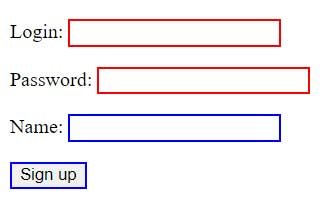
A number of pseudo-classes are used to work with form elements:
- :enabled : selects the element if it is selectable (i.e. it doesn’t have the disabled attribute set)
- :disabled : selects the element if it is not selectable (i.e. it has the disabled attribute set)
- :checked : selects an element if it has the checked attribute set (for checkboxes and radio buttons)
- :default : selects elements by default
- :valid : selects an element if its value passes HTML5 validation
- :invalid : selects an element if its value does not pass validation
- :in-range : selects an element if its value is in a certain range (for slider type elements)
- :out-of-range : selects an element if its value is not in a certain range
- :required : selects an element if it has the required attribute set
- :optional : selects an element if it doesn’t have the required attribute set
Pseudo-classes enabled and disabled
The enabled and disabled pseudo-classes select form elements depending on whether they have the disabled attribute set:
<!DOCTYPE html>
<html lang="en">

<head>
    <meta charset="UTF-8">
    <meta http-equiv="X-UA-Compatible" content="IE=edge">
    <meta name="viewport" content="width=device-width, initial-scale=1.0">
    <title>Selectors in CSS3</title>
</head>

<body>
    <p><input type="text" value="Enabled" /></p>
    <p><input type="text" disabled value="Disabled" /></p>
</body>

</html>

Pseudo-class checked
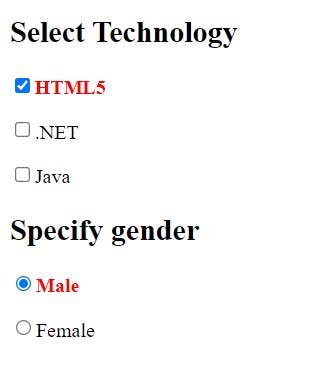
The checked pseudo- class styles form elements that have the attribute set checked:
<!DOCTYPE html>
<html lang="en">

<head>
    <meta charset="UTF-8">
    <meta http-equiv="X-UA-Compatible" content="IE=edge">
    <meta name="viewport" content="width=device-width, initial-scale=1.0">
    <title>Selectors in CSS3</title>
</head>

<body>
    <h2>Select Technology</h2>
    <p>
        <input type="checkbox" checked name="html5" /><span>HTML5</span>
    </p>
    <p>
        <input type="checkbox" name="dotnet" /><span>.NET</span>
    </p>
    <p>
        <input type="checkbox" name="java" /><span>Java</span>
    </p>
    <h2>Specify gender</h2>
    <p>
        <input type="radio" value="Male" checked name="gender" /><span>Male</span>
    </p>
    <p>
        <input type="radio" value="Female" name="gender" /><span>Female</span>
    </p>
</body>

</html>
The selector:checked + span allows you to select an element adjacent to the selected form element.
Pseudo-class default
The :default pseudo- class selects a standard form element. As a rule, the submit button acts as such an element:
<!DOCTYPE html>
<html lang="en">

<head>
    <meta charset="UTF-8">
    <meta http-equiv="X-UA-Compatible" content="IE=edge">
    <meta name="viewport" content="width=device-width, initial-scale=1.0">
    <title>Selectors in CSS3</title>
</head>

<body>
    <form>
        <input name="login" />
        <input type="submit" value="Submit" />
    </form>
</body>

</html>

Pseudo-classes valid and invalid
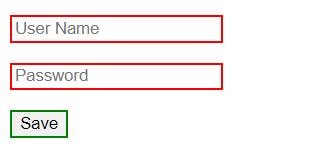
The :valid and :invalid pseudo- classes style form elements depending on whether they pass validation or not.
<!DOCTYPE html>
<html lang="en">

<head>
    <meta charset="UTF-8">
    <meta http-equiv="X-UA-Compatible" content="IE=edge">
    <meta name="viewport" content="width=device-width, initial-scale=1.0">
    <title>Selectors in CSS3</title>

</head>

<body>
    <form>
        <p><input type="text" name="login" placeholder="User Name" required /></p>
        <p><input type="password" name="password" placeholder="Password" required /></p>
        <input type="submit" value="Save" />
    </form>
</body>

</html>
Pseudo-classes in-range and out-of-range
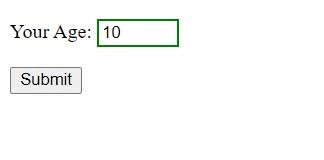
The :in-range and :out-of-range pseudo -classes style form elements depending on whether their value falls within a certain range. This primarily applies to the element <input type=”number” />
<!DOCTYPE html>
<html lang="en">

<head>
    <meta charset="UTF-8">
    <meta http-equiv="X-UA-Compatible" content="IE=edge">
    <meta name="viewport" content="width=device-width, initial-scale=1.0">
    <title>Selectors in CSS3</title>

</head>

<body>
     <form>
        <p>
            <label for="age">Your Age:</label>
            <input type="number" min="1" max="50" value="10" id="age" name="age" />
        </p>
        <input type="submit" value="Submit" />
    </form>
</body>

</html>
Here, the and attributes max set the range in which the value entered in the field should fall:
Pseudo-classes required and optional
The :required and :optional pseudo -classes style an element depending on whether it has the required:
<!DOCTYPE html>
<html lang="en">

<head>
    <meta charset="UTF-8">
    <meta http-equiv="X-UA-Compatible" content="IE=edge">
    <meta name="viewport" content="width=device-width, initial-scale=1.0">
    <title>Selectors in CSS3</title>

</head>

<body>
    <form>
        <p>
            <label for="login">Login:</label>
            <input type="text" id="login" name="login" required />
        </p>
        <p>
            <label for="password">Password:</label>
            <input type="password" id="password" name="password" required />
        </p>
        <p>
            <label for="name">Name:</label>
            <input type="text" id="name" name="name" />
        </p>
        <input type="submit" value="Sign up" />
    </form>
</body>

</html>