Child selectors differ from descendant selectors in that they allow only elements of the first level of nesting to be selected. For example:
    <h2>Child selectors:CSS </h2>
    <div>
        <p>This is a paragraph</p>
    </div>
Although there are as many as three elements nested in the body element – h2, div, p, but only two of them are children – div and h2, since they are in the first nesting level. And the p element is at the second nesting level, because it is nested inside a div element, and not just a body element.
An angle bracket character is used to refer to child elements:
<!DOCTYPE html>
<html lang="en">

<head>
    <meta charset="UTF-8">
    <meta http-equiv="X-UA-Compatible" content="IE=edge">
    <meta name="viewport" content="width=device-width, initial-scale=1.0">
    <title>Child selectors: CSS3</title>
    <style>
        .article>p {
            color: red;
        }
    </style>
</head>

<body>
    <div class="article">
        <p>this is a paragraph</p>
        <div class="content">
            <p>This is another paragraph</p>
        </div>
    </div>
</body>

</html>
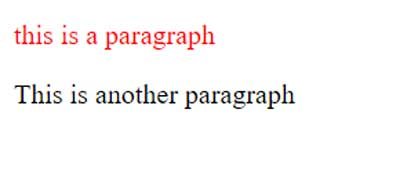
The block with the article class has two paragraphs. The selector .article > pselects only those paragraphs that are directly in the article block:
If we were to use another selector without the > symbol
<!DOCTYPE html>
<html lang="en">

<head>
    <meta charset="UTF-8">
    <meta http-equiv="X-UA-Compatible" content="IE=edge">
    <meta name="viewport" content="width=device-width, initial-scale=1.0">
    <title>Child selectors: CSS3</title>
    <style>
        .article p {
            color: red;
        }
    </style>
</head>

<body>
    <div class="article">
        <p>this is a paragraph</p>
        <div class="content">
            <p>This is another paragraph</p>
        </div>
    </div>
</body>

</html>
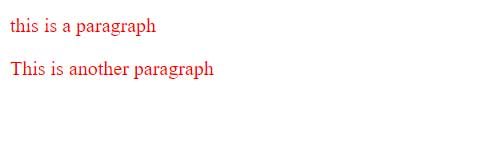
Then the style would apply to all paragraphs at all levels of nesting: