
CSS provides special styling properties for lists. One such property is list-style-type . It can take the following values for numbered lists:
- decimal: decimal numbers, counting from 1
- decimal-leading-zero: decimal numbers that are preceded by a zero, e.g. 01, 02, 03, … 98, 99
- lower-roman: lowercase Latin numerals, e.g. i, ii, iii, iv, v
- upper-roman: uppercase Latin numerals, e.g. I, II, III, IV, V…
- lower-alpha: lowercase English letters, e.g. a, b, c…, z
- upper-alpha: uppercase Latin letters, e.g. A, B, C, … Z
For unordered lists:
- disc: black disc
- circle: empty circle
- square: black square
For example:
ul{
    list-style-type: square;
}
To generally disable bullets on list items, use the value none:
ul{
list-style-type: none;
}
This property can be applied both to the entire list and to individual elements. For example:
<!DOCTYPE html>
<html lang="en">
<head>
    <meta charset="UTF-8">
    <meta http-equiv="X-UA-Compatible" content="IE=edge">
    <meta name="viewport" content="width=device-width, initial-scale=1.0">
        <title>Styling lists in CSS3</title>
</head>

<body>
    <ol>
        <li>Element 1</li>
        <li class="decimal">Element 2</li>
        <li>Element 3</li>
        <li>Element 4</li>
    </ol>
</body>

</html>
list-style-position
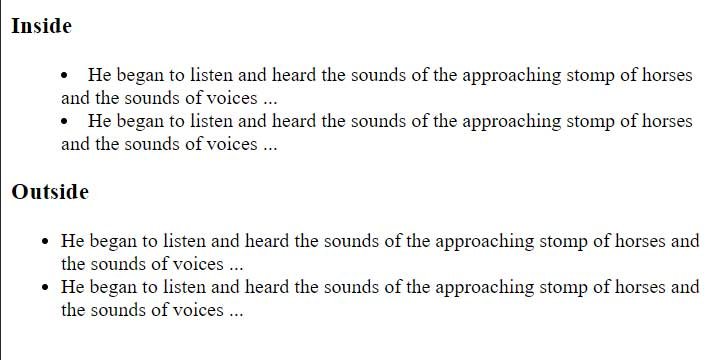
Web browsers typically display list markers to the left of list items. With the list-style-position property, we can adjust their positioning. This property takes two values: outside(default) and inside(ensures even distribution across the width).
<!DOCTYPE html>
<html lang="en">
<head>
    <meta charset="UTF-8">
    <meta http-equiv="X-UA-Compatible" content="IE=edge">
    <meta name="viewport" content="width=device-width, initial-scale=1.0">
        <title>Styling lists in CSS3</title>
</head>

<body>
    <h3>Inside</h3>
    <ul class="inside">
        <li>He began to listen and heard the sounds of the approaching stomp of horses and the sounds of voices ...</li>
        <li>He began to listen and heard the sounds of the approaching stomp of horses and the sounds of voices ...</li>
    </ul>
    <h3>Outside</h3>
    <ul class="outside">
        <li>He began to listen and heard the sounds of the approaching stomp of horses and the sounds of voices ...</li>
        <li>He began to listen and heard the sounds of the approaching stomp of horses and the sounds of voices ...</li>
    </ul>
</body>

</html>
list-style-image
The list-style-image property allows you to set an image as a marker:
<!DOCTYPE html>
<html lang="en">

<head>
    <meta charset="UTF-8">
    <meta http-equiv="X-UA-Compatible" content="IE=edge">
    <meta name="viewport" content="width=device-width, initial-scale=1.0">
    <title>Styling lists in CSS3</title>
</head>

<body>
    <ul>
        <li>iPhone 6S</li>
        <li>Galaxy S7</li>
        <li>Nexus 5X</li>
        <li>Lumia 950</li>
    </ul>
</body>

</html>
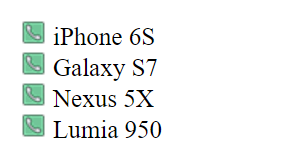
The property list-style-image takes the path to the image as its value url(phone_touch.png), where “phone_touch.png” is the name of the image file. That is, in this case, it is assumed that the phone_touch.png image file is located in the same folder as the web page.